A router VPN works by integrating the capability of the VPN technology into the networking device. It helps secure all the devices connected to the router simultaneously.
What is Router VPN: Explore 7 Best Routers Along with a VPN Installation Guide
You must have previously used a Virtual Private Network, or VPN, technology to secure your network while using the internet. But have you heard of the router VPN combination before?
With the help of a router VPN, the user can easily extend the VPN security to more than one device at the same time, provided that all devices are connected to the same router.
People are shifting to router VPN from VPN because the former comes with greater capabilities. So, why stuck on the traditional VPN with a delayed proxy? Learn about router VPNs, and switch when possible.
Table of Contents:
What is a Router VPN?
A router VPN is a networking device that has an in-built VPN facility. Rather than using a Virtual Private Network software individually, you can take advantage of an encrypted/well-protected network right from the comfort of a router.
It enables owners to save limited resources and use all electronics with utmost security. By combining a VPN with a router, the benefits of network security can be extended to all household or office smart devices. Consequently, this has become a need in most device-packed houses or corporate offices.
Prerequisite to the Most Optimal VPN Router Performance
If you need the best VPN router experience at home or in a corporate space, you must focus on fast connection, strong VPN, powerful router processor, bandwidth compatibility, and Ethernet cables before installing any router.
- Fast Connection: You must ensure a fast internet connection from a capable service provider. Also, make sure that the provider has a robust service and maintenance facility in your locality.
- Strong VPN: Next, you need to research thoroughly before deciding on VPN software. Only select the one that comes with a reliable capability.
- Powerful Router Processor: If the router has a small processor, it will not be able to provide an optimal experience. Look for a powerful processor in a VPN router. Explore all options, compare specifications, and then only pick the right one.
- Bandwidth Compatibility: Additionally, your server must hold adequate capacity for the highest uptime with minimal service failures. Talk to your service provider in advance or get assistance from an expert.
- Ethernet Cables: If possible, choose an Ethernet cable over Wi-Fi if you want to increase the speed. However, this comes with a downside, as the wires can create an additional burden on the infrastructure.
7 Best VPN Router Options from Top Companies
For a VPN router for home or corporate office, you can consider any of the options provided below. The following table includes the most advanced routers (with VPN technology) from major brands, such as Asus, TP-Link, GL.iNet, Linksys, Privacy Hero, InvizBox, and ExpressVPN.
| S. No. | Company Name | Popular Models |
| 1. | Asus | RT-AX86U RT-AX82U ROG Rapture GT-AX11000 RT-AX88U RT-AX58U RT-AX68U GT-AXE11000 ZenWiFi Pro XT12 GT-AX6000 GT-AXE16000 GT-AX11000_PRO RT-AX86U_PRO RT-AX88U_PRO RT-BE96U GT-BE98_PRO |
| 2. | TP-Link | AX3000 BE19000 Archer GE800 Archer AX55 BE800 |
| 3. | GL.iNet | Flint 2 (GL-MT6000) Flint 3 (GL-BE9300) Brume 2 (MT2500A) Beryl AX Flint 2 (GL-MT6000) Slate AX (GL-AXT1800) Beryl AX |
| 4. | Linksys | WRT3200 ACM MX4200 |
| 5. | Privacy Hero | Privacy Hero 2 VPN Router |
| 6. | InvizBox | InvizBox 2 |
| 7. | ExpressVPN | Aircove Aircove Go (New Addition) |
Note: Don’t forget to check specifications before you purchase any networking device. It will help you decide on the most suitable router as per your needs or expectations.
Also Read: VPN Gateway: Meaning, Types, Benefits, Deployment & More!
How to Install VPN on Router?
Consider the following steps to learn how to install a VPN on your router. You can use any vpn for router, such as OpenVPN, Free VPN, Paid VPN, and Webavior, the most advanced and new-gen private network solution, supported by most routers.
Note: The router administration page might not be the same for different routers. Thus, for specific guidance, refer to the user manual of your device or connect with the support for quick assistance with installing a VPN on the router.
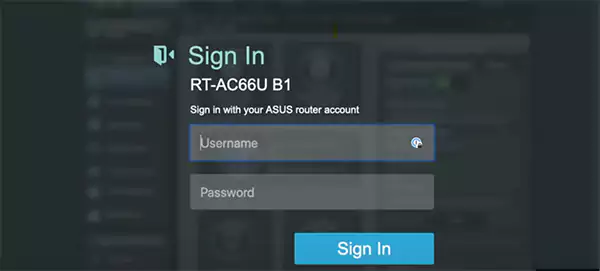
- Open your router’s official portal and go to the sign-in interface. Use the login credentials and access the dashboard or control panel.
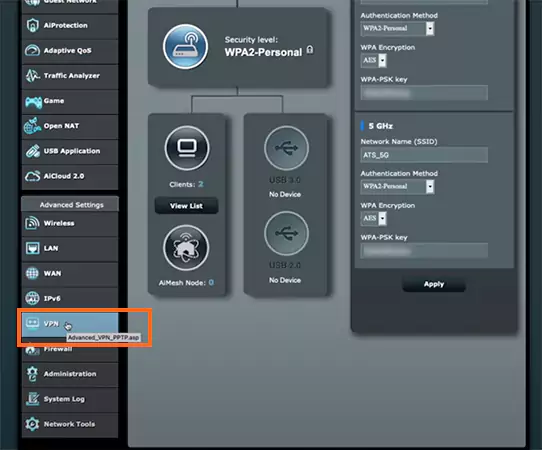
- On the control panel, locate “VPN” in the left-side menu section.
- Click on the “VPN Client”.
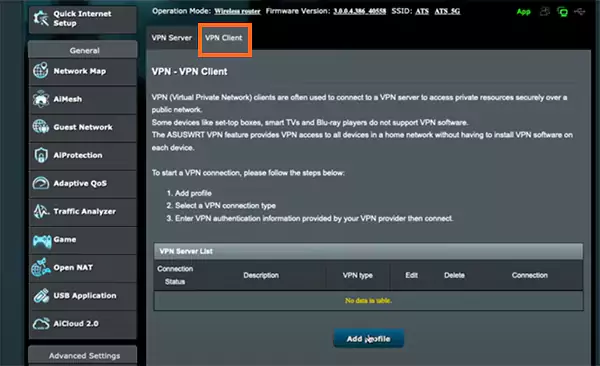
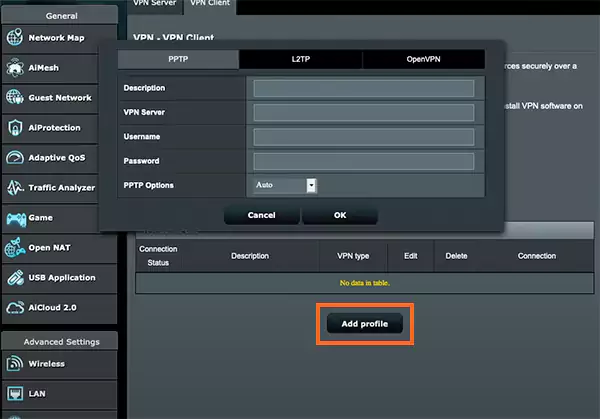
- Tap on “Add profile” and get a form opened to add a VPN server to the router.
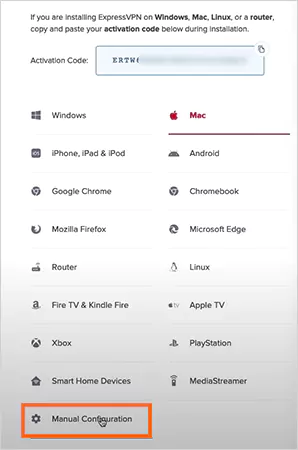
- Access your VPN website and go to the set-up page, where you need to locate and choose the “Manual Configuration”.
- Get details from the “Manual Configuration” section and fill in the following form, as accessed before. For submission, click on “OK”.
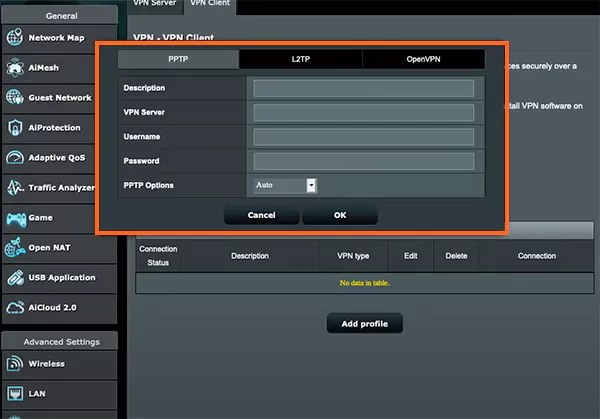
Note: Don’t forget to choose your preferred option from PPTP, L2TP, and OpenVPN in the form before entering the credentials. These are different VPN options with different pros and cons.
- Finally, click on the “Activate” to initiate the integration and complete the process.

After the activation is complete, the “Activate” button will turn into “Deactivate”, and you have set up the VPN on your router. If you face any issues or are unable to use VPN in the router, connect with the support either provided by your VPN provider or the router company.
Also Read: What is a VPN Tunnel? Definition, Types, And How It Functions
Benefits of Using a Router VPN
If you have decided to shift from vpn to vpn router, consider all the advantages that this change will bring to your virtual environment. One can enjoy comprehensive device protection, network security, enhanced accessibility, a blocking facility, better anonymity, and 24/7 safety.
- All-Device Protection: With a router on, all your smart electronics (connected to the internet) get protected at the same time. The benefits of a VPN reach all devices simultaneously, helping save time and money.
- Network Security: The network between your devices and the open internet becomes highly secure due to top-notch data encryption. As a result, cyberattackers cannot steal or illegally make use of your personal information.
- Enhanced Accessibility: A VPN, when extended to all your electronics with a router, makes it easy to access even geo-restricted content on the internet. You can easily change your IP addresses on all devices and ensure a better experience.
- Blocking Facility: This combination of a VPN in a router furthermore enables users to block unwanted ads or even someone who might be tracking or spying on you! And that is true for all your household devices collectively.
- Better Anonymity: If you want to keep your identity hidden or altered while surfing the World Wide Web on all your devices, a router VPN helps you do that very easily. Just change your current location with a single click or a few steps, and your IP address will be altered immediately, masking your true virtual identity.
- 24/7 Safety: All the above-mentioned aspects are available round the clock so that you enjoy the best virtual experience day in and day out.
How to Choose the Most Suitable VPN Router?
To lay your hands on the best VPN networking device, look for certain major aspects, such as compatibility, installation ease, speed and bands, and VPN features, as briefly mentioned below.
- Compatibility: Always make sure that there is 100% fittingness between the router and the VPN of your choice. Otherwise, guesswork or hasty decisions might cause compatibility issues.
- Installation Ease: Choose a pre-configured router so that you don’t have to be involved in the hassle of installation after opening the packaging.
- Speed & Bands: Never go with an old Wi-Fi technology, as only the latest can ensure the top speed and robust security.
- VPN Features: In case you are planning to buy a pre-installed VPN router, look for VPN features and specifications for your preferences. Perhaps a pre-integrated VPN doesn’t have the capabilities you might want to have.
Also Read: Industrial Remote Access VPN: Secure Connectivity for Remote Operations
Conclusion
As mentioned above, a router VPN is better compared to a separate VPN solution. Once the VPN has been installed on a router, it becomes the hub for internet security, as the power of encryption gets extended to all the devices on the network at the same time. Thus, if you are planning to switch to this integrated approach to internet security, router VPN will reduce costs and help you allocate your limited resources better.
FAQs
How does a router VPN work?
How many devices can connect to a VPN router?
It depends on the router’s capacity. However, robust routers can even connect up to 10 devices at once.
Can a VPN router protect all devices?
Yes, your router VPN can protect all the devices on its network.